Bank statements to Excel. Verified.
Upload a PDF statement, get a clean spreadsheet with every transaction checked against the running balance.
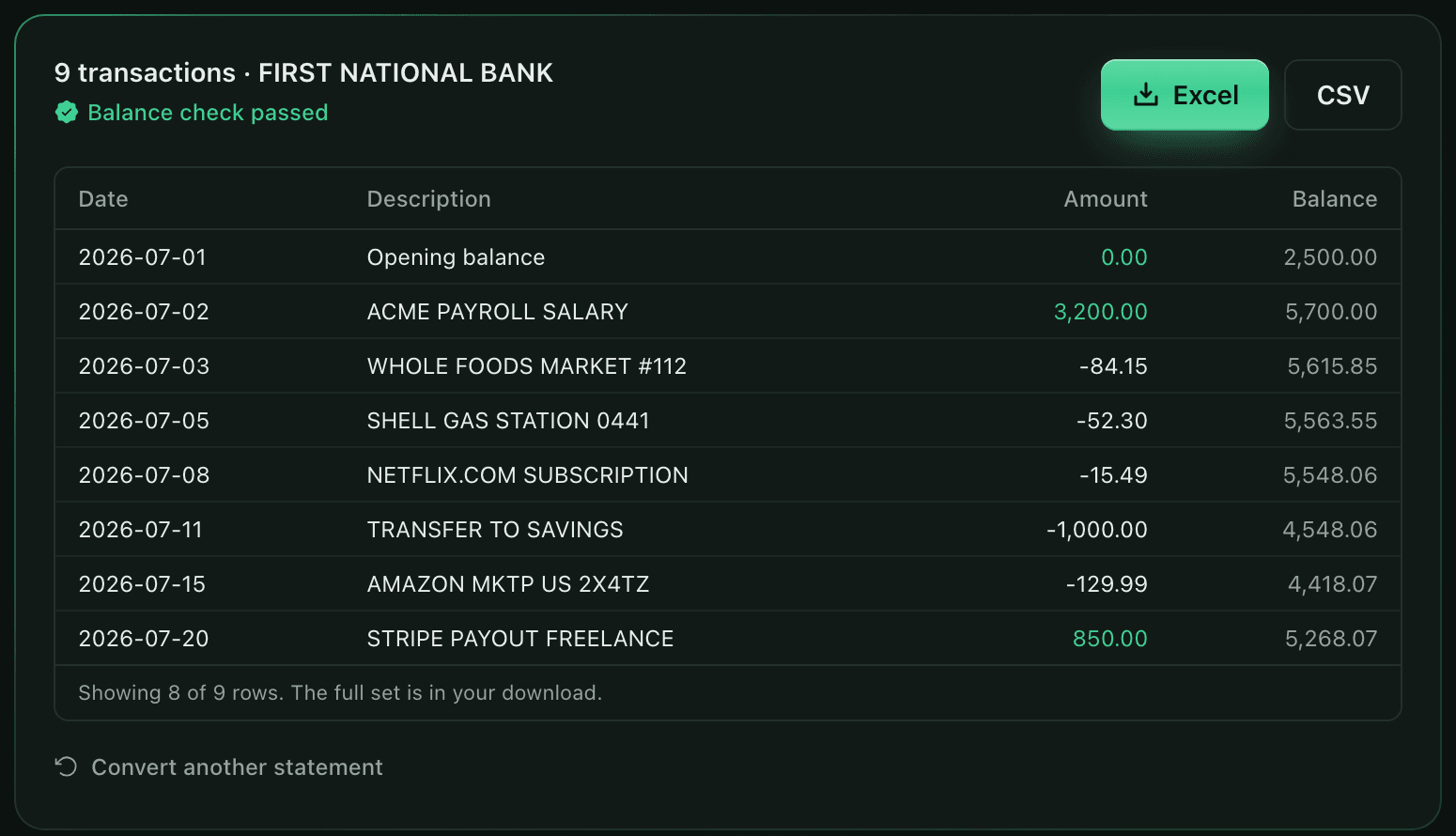
No statement handy? or open the finished Excel
0
banks and fintechs recognized
0%
of rows balance-checked
<60s
typical conversion time
0
statements stored. Ever.
From PDF to a sheet you can trust
Same statement, same numbers — turned into something you can sort, sum and hand over.
FIRST NATIONAL BANK
Account Statement — July 2026
statement_july.xlsx
4 rows · balance checked
| Date | Description | Amount | Balance | Balance check |
|---|---|---|---|---|
| 2026-07-01 | Opening balance | — | 2,500.00 | |
| 2026-07-02 | ACME PAYROLL SALARY | +3,200.00 | 5,700.00 | |
| 2026-07-03 | WHOLE FOODS MARKET #112 | -84.15 | 5,615.85 | |
| 2026-07-05 | SHELL GAS STATION 0441 | -52.30 | 5,563.55 |
Numbers you can hand to your accountant
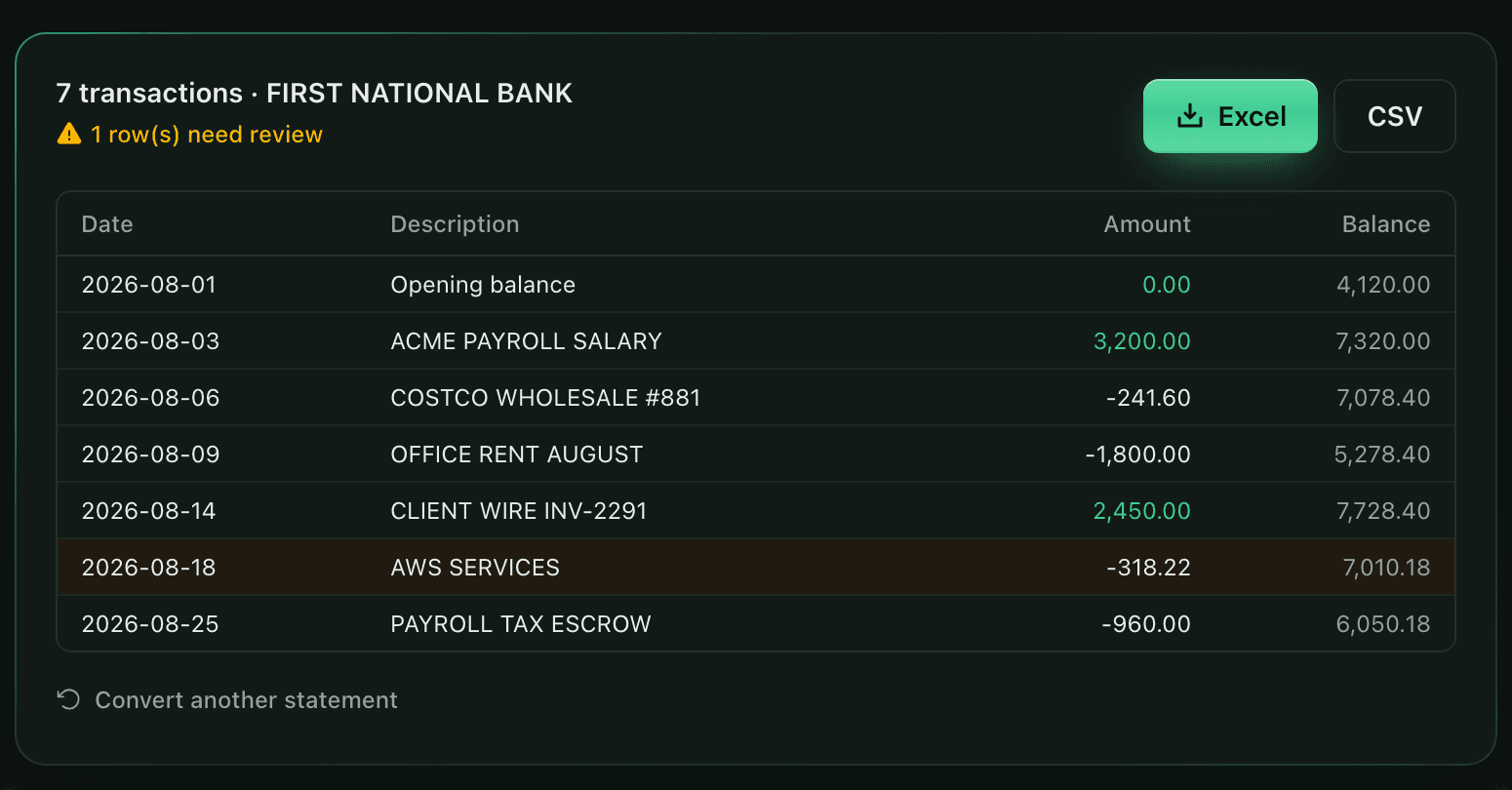
OCR tools guess. We recompute the running balance across every row, so an extraction error can't slip into your books unnoticed. When something doesn't add up, the exact row is highlighted in your export.
The capture on the right is a real run: we fed the parser an August statement whose printed balance is off by $400 on one line, and it flagged exactly that line.
Not another OCR tool
Generic converters guess characters. We reconcile numbers.
Your bank data stays yours
$ statementsheet --convert july.pdf
reading pages ................ 4
extracting rows .............. 47
running balance check ........ passed
building workbook ............ 11.8 kB
purging statement ............ done
bytes of your data retained .. 0
0
statements stored
Your PDF is processed in memory and purged the moment your spreadsheet is generated. There is no bucket, no cache, no "deleted after 30 days".
Only metering metadata
Our database knows a file name, a page count and a timestamp. It has never seen a transaction, a balance or an account number.
GDPR-aligned by design
Built for EU and US users: data minimization is the architecture, not a policy promise. Read the path of one file or the privacy policy.
Works with statements from any bank
The parser reads the document itself, not a fixed template. These are the banks we see most often:
Simple pricing, honest metering
Starter
$15 /month
$150/year if paid yearly
- 400 pages / month
- Excel + CSV export
- Balance verification
- Multi-file merge
Pro
$29 /month
$290/year if paid yearly
- 1,200 pages / month
- Excel + CSV export
- Balance verification
- Multi-file merge
- Priority processing
Business
$59 /month
$590/year if paid yearly
- 4,000 pages / month
- Excel + CSV export
- Balance verification
- Multi-file merge
- Priority processing
- Priority support
Pages only count on successful conversions. Cancel anytime from the billing portal.
Questions, answered
Anything else? Write to support@statementsheet.org and a human replies within a day.
Do you store my bank statements?+
No. Files are processed in memory and discarded right after your spreadsheet is generated. Our database only records how many pages you converted, never what was in them.
Does it work with scanned statements?+
Yes. The parser reads scans and photographed documents. Accuracy on poor scans is lower, which is exactly why every conversion ships with the balance check to catch extraction errors.
How accurate is it?+
We do not quote a percentage, because a number like 99% tells you nothing about which row is wrong. Instead every conversion recomputes the running balance line by line against the balances printed on the statement, and any row that does not reconcile is flagged before you download. On a clean digital PDF that is normally zero flags; on a poor scan it is the rows you need to look at.
What is the balance check?+
We recompute the running balance from row to row. If an extracted amount doesn't reconcile with the balance printed on your statement, that row is flagged in the preview and highlighted in the Excel file.
Which formats do I get?+
Three files. Excel (.xlsx) with formatting and flagged rows; a plain CSV with Date, Description, Amount and Balance; and a separate CSV for QuickBooks with just Date, Description and Amount. That last one exists because QuickBooks reads a fourth column as a debit — hand it our normal CSV and it would import your running balance as money. Xero and Google Sheets take either file.
Can I convert several statements at once?+
Yes. Drop multiple PDFs together and they are merged into a single chronological spreadsheet, which is handy for quarterly bookkeeping or loan applications.
What does it cost?+
Create a free account and your first statement (up to 10 pages) is on us — no card required. After that, plans start at $15/month for 400 pages, and you can cancel anytime from the billing portal.
Stop retyping statements.
A free account takes 20 seconds and your first conversion costs nothing.